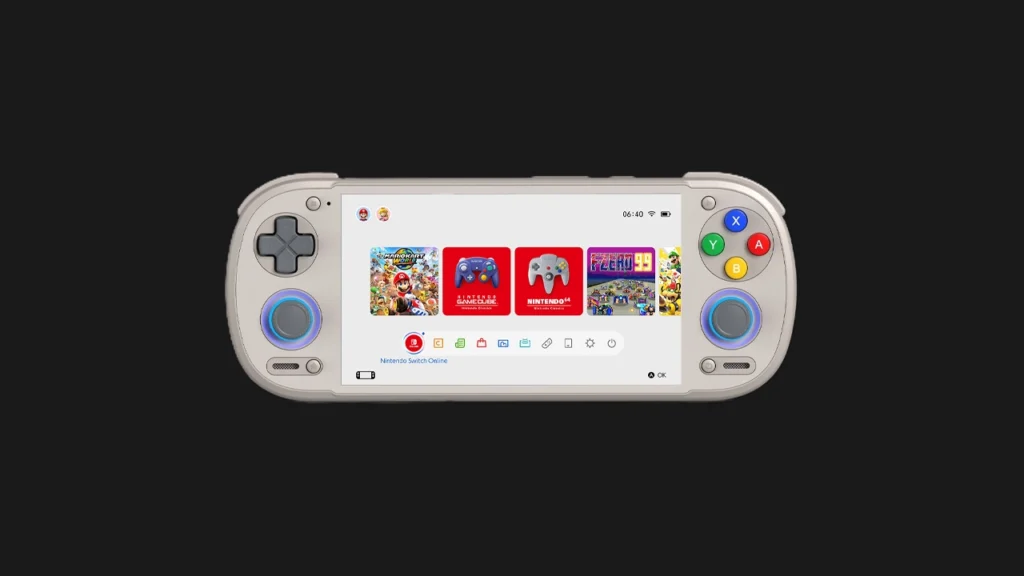

What Is Gamenative?
Gamenative is a game library management frontend for Android emulation handhelds — the layer between your game files and your emulators that organises your library with box art, metadata, and a unified launcher interface. Think of it as the home screen for your entire emulation collection: instead of opening each emulator separately and hunting for your games within it, Gamenative presents all your games from all systems in one polished interface, letting you launch any title directly regardless of which emulator it uses underneath.
Gamenative V1.1.0 Drops With Plenty of New Features, according to Retro Handhelds’ July 3, 2026 report. This makes it a timely alternative to evaluate alongside the established frontends that dominate the Android emulation scene: Daijisho, ES-DE Frontend, and the manufacturer launchers on Retroid and Anbernic devices.
Why Use a Third-Party Frontend at All?
Out of the box, most Android emulation handhelds come with a manufacturer launcher — Retroid’s “Retroid Experience” launcher, or Anbernic’s built-in launcher. These are functional but designed for each brand’s specific ecosystem. For users with large libraries spanning multiple systems, or who want a more polished, console-like browsing experience, third-party frontends offer significant improvements:
- Unified library: All your Switch, PS2, GameCube, GBA, and other games in one browsable interface regardless of which emulator they use
- Automatic metadata scraping: Box art, descriptions, ratings, and screenshots pulled automatically from online databases
- Custom themes: Visual customisation beyond what manufacturer launchers allow
- Collections and filters: Organise your library by system, genre, play time, or custom tags
- Recently played tracking: Quick access to games you’ve been playing without navigating full library lists
Gamenative v1.1.0: What’s New
The v1.1.0 update marks a significant feature expansion for Gamenative. While Retro Handhelds’ coverage confirmed the release and described it as bringing “plenty of new features,” the specific changelog details require checking Gamenative’s official GitHub or release notes for the complete list. Based on the update version numbering (minor version increment from 1.0.x to 1.1.0), this is a meaningful feature addition rather than a patch release. Community discussion following the announcement has been positive, with early testers noting improved performance and expanded system support.
Gamenative vs Daijisho vs ES-DE: How Do They Compare?
Daijisho
Daijisho has been the most widely recommended third-party frontend for Android emulation handhelds throughout 2025 and into 2026. Its strengths are its highly customisable theme system, solid metadata scraping from multiple sources, and active development. It is the frontend recommended in GammaOS documentation and frequently suggested in community setup guides. Its weakness historically has been a steeper learning curve for new users compared to simpler alternatives.
ES-DE Frontend
ES-DE (EmulationStation Desktop Edition) is the Android port of the emulation frontend that has long been the standard on dedicated Linux-based devices like the Steam Deck through EmuDeck. If you have prior experience with EmulationStation on any platform, ES-DE on Android will feel immediately familiar. It has strong community theme support and excellent EmuDeck integration. Its Android build is slightly less optimised than Daijisho for some Android-specific handheld hardware.
Gamenative
Gamenative has positioned itself as a more approachable alternative with a cleaner default interface and faster initial setup. Community comparisons suggest it offers a smoother experience for users who want a polished result without the configuration investment that Daijisho requires. The v1.1.0 update expands its feature set toward parity with the established frontends in areas like system support breadth and metadata customisation.
Retroid Experience (Built-in)
For Retroid Pocket owners specifically: Retroid’s built-in launcher handles emulator management and basic library display competently and integrates tightly with Retroid’s hardware features. For users with straightforward single-device setups, it may be sufficient. For large, multi-system libraries or users who want more visual customisation, a third-party frontend is worth the additional setup.
How to Set Up Gamenative for Switch Emulation
The process for adding Switch games to any frontend — including Gamenative — follows the same basic structure:
- Install Gamenative from its official source (GitHub or the developer’s official distribution channel)
- Point Gamenative to your game directories on your microSD or internal storage — for Switch games, this is the folder containing your legally obtained NSP or XCI backups
- Configure which emulator Gamenative should use for Switch games — Eden, Citron, or Kenji-NX depending on your preference
- Allow Gamenative to scrape metadata — it will pull box art, descriptions, and ratings automatically for your Switch titles
- Games appear in your unified library and launch directly into your configured Switch emulator when selected
Note: Gamenative handles library presentation and launch — it does not replace or configure the emulators themselves. You still need Eden, Citron, or Kenji-NX properly set up with your Switch firmware and keys before Gamenative can meaningfully launch Switch games. See our Eden setup guide if you haven’t completed that step yet.
Should You Switch Frontends?
If you are happy with your current launcher — whether that’s Retroid’s built-in Experience, Daijisho, or ES-DE — there is no compelling reason to switch immediately. Frontend preference is highly personal, and the time investment of migrating a configured library setup is not trivial. Gamenative v1.1.0 is worth evaluating if you are setting up a new device fresh, are frustrated with your current frontend’s limitations, or specifically want a simpler configuration experience than Daijisho provides. Watch for community reviews of the v1.1.0 specific features on r/EmulationOnAndroid and GBAtemp over the coming weeks as users put the new version through its paces.